

1
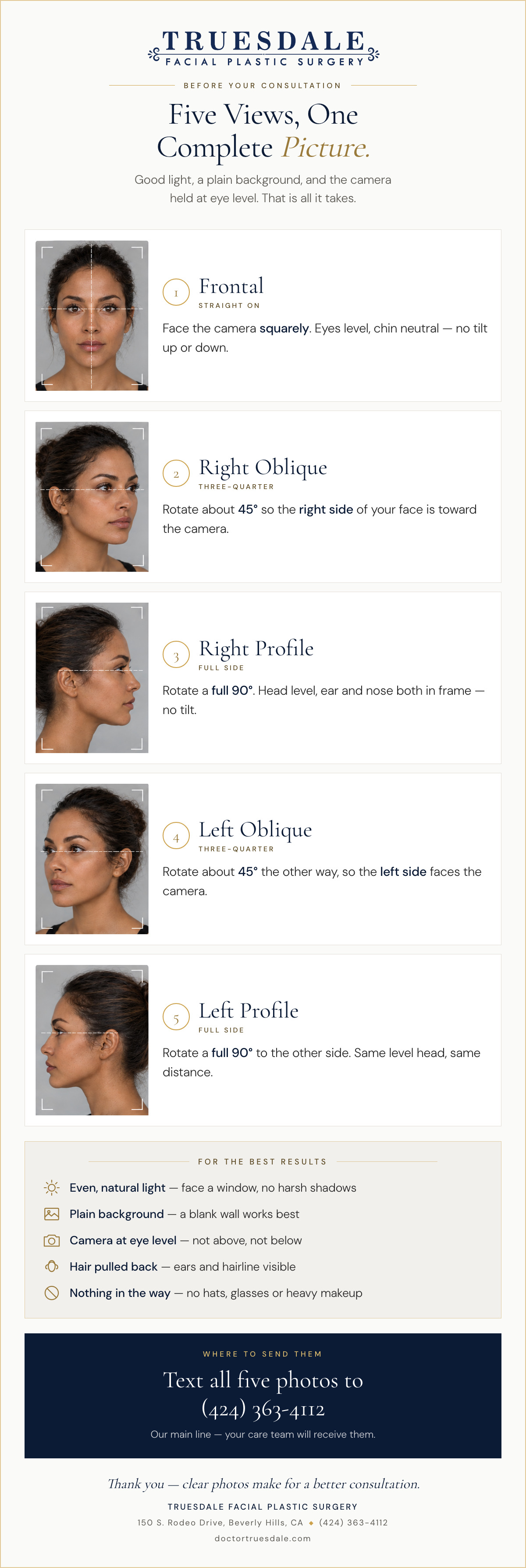
Frontal
Straight On
Face the camera squarely. Eyes level, chin neutral — no tilt up or down.

2
Right Oblique
Three-Quarter
Rotate about 45° so the right side of your face is toward the camera.

3
Right Profile
Full Side
Rotate a full 90°. Head level, ear and nose both in frame — no tilt.

4
Left Oblique
Three-Quarter
Rotate about 45° the other way, so the left side faces the camera.

5
Left Profile
Full Side
Rotate a full 90° to the other side. Same level head, same distance.
For the Best Results
- Even, natural light — face a window, no harsh shadows
- Plain background — a blank wall works best
- Camera at eye level — not above, not below
- Hair pulled back — ears and hairline visible
- Nothing in the way — no hats, glasses or heavy makeup
Where to Send Them
Text all five photos to
(424) 363-4112
(424) 363-4112
Our main line — your care team will receive them.